How to Quickly Spot Missing Routine Reports
If a routine email doesn't arrive, would you notice?
Problem
At work, most of my automation is configured to send an email on completion. For example, I should receive a report every night which tells me my Function App ran a cron job correctly. However if something breaks, the emails stop.
Now ask yourself - would you notice if the emails stopped? Do you have a task in your calendar to check if you received each email? Reading this, are you thinking “Now that I think of it, I don’t remember the last time I saw my daily backups summary email!”, not good!
Solution
- In Outlook, create an folder called “Daily Reports”, “Weekly Reports”, or “Monthly Reports” - Whatever suits your use case
- Inside the folder, create a folder for each report you expect on this frequency
- Set up Outlook rules based on the email subjects so your emails go into their respective folder.
Every morning all you need to do is check to make sure everything has a “1”. If there isn’t one unread email in the folder, you know a report failed.
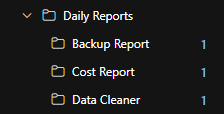
In the above, we can see all the reports ran successfully overnight.
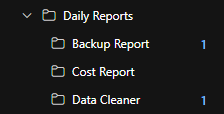
But this time, “Cost Report” is missing an unread email so we know this report failed.
This works best when you have multiple reports set up in the same frequency group (Daily, Weekly, Monthly) because you’ll be drawn to the other unread messages. If you only have one monthly report then I recommend sticking to Calendar Reminders.
Summary
It might feel like a simple, very obvious tip but it’s one of those things you don’t think about until you realise things are slipping through the net so I thought I’d share. Plus I said I’d do at least one post a month and I’m struggling for ideas!