Using AHK to fix New Outlook Quick Actions
New Outlook doesn't support Ctrl+Shift+1-3 for Quick Steps! Here's a workaround using AHK.

Despite the complaints, the new Outlook app isn’t going to go anyway anytime soon. It does make sense - Why maintain a seperate web version from the one we know and love? I am forcing myself to use the New Outlook now so I can deal with the pain early instead of later.
Unfortunately, Quick Actions no longer support Ctrl+Shift+1-4 shortcuts, breaking over 15 years of muscle memory…
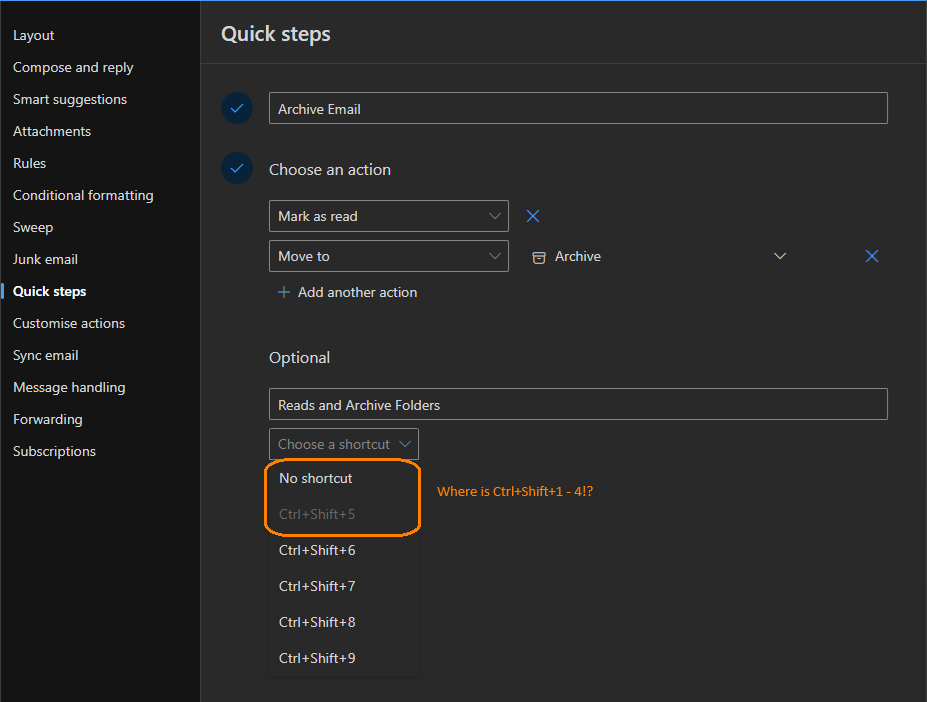 Quick Action shortcuts 1-4 missing in the New Outlook
What Are Quick Actions?
Quick Actions is a lesser-known but powerful feature of Outlook you can incorporate into your workflow. Creating a Quick Action allows you to make Outlook run specific steps when you push keybindings. For example, Ctrl+Shift+1 could mark an email as read and move it to an “Archive” folder, it could flag the email or create a task. You can configure these from the Settings menu.
The problem is in the new Outlook, you can no longer use Ctrl+Shift+1, 2, 3 or 4 for Quick Actions. That’s fine for new users, but if you’ve spent years using those shortcuts, it’s a big disruption.
 My hand is locked into this shape. Ctrl+Shift+5 is just awkward!
Code
The below code can be used with Auto Hot Key to redirect Ctrl+Shift+1 to Ctrl+Shift+5, 2 to 6 and 3 to 7:
1
2
3
^+1::Send("^+5")
^+2::Send("^+6")
^+3::Send("^+7")
Configuring Auto Hot Key
After installing Auto Hot Key, you can run the above code by saving the text into a file with the .ahk extension.
To immediately have this code run when you log into your machine:
- Push Win+R to open the Run Dialogue
- Enter
Shell:Startupand push enter - Copy/Save the .ahk file here.
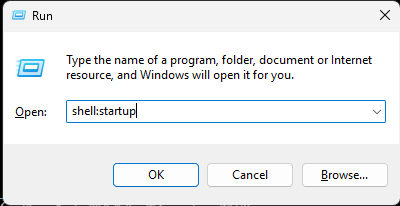
The Shell:Startup folder is a user-specific folder. Anything in this location will run when you login to your machine.
Would you like to Know More?
This just scratches the surface of what AHK can do. You can check out my personal (and growing) AHK file here.